· 8 min read
Building HyperVToolsX
From Small PowerShell Scripts to a Complete Hyper-V Management Tool
- #Hyper-V
- #DIY
- #Scripts
A lot of my projects start in the same way.
I run into a problem at work, find myself doing the same thing repeatedly, and eventually think:
"There has to be a better way to do this."
HyperVToolsX started exactly like that.
Working with Hyper-V environments means dealing with a lot of small administrative tasks. Checking virtual machines, looking at configurations, collecting information, troubleshooting issues, and performing routine operations.
None of these tasks are particularly difficult.
But when you're doing them repeatedly, they start taking time.
That's where the idea for HyperVToolsX came from.
It Started With PowerShell
Before HyperVToolsX became a proper application, I was already using PowerShell to work with Hyper-V.
PowerShell is incredibly powerful for Hyper-V administration.
You can do things like:
Get-VM
or:
Get-VMHardDiskDrive
or:
Get-VMMemory
These commands are great when you know exactly what you're looking for.
But after using them repeatedly, I started thinking about something else.
What if the useful commands were brought together into one place?
Instead of remembering different commands every time, why not create a tool that makes those operations easier?
That was the beginning of HyperVToolsX.
The Problem I Wanted to Solve
Hyper-V already provides management tools.
So I wasn't trying to replace Hyper-V Manager or PowerShell.
The idea was different.
I wanted to create a tool focused on the practical tasks I personally found useful when working with Hyper-V.
Things that normally required:
Open PowerShell
        ↓
Remember command
        ↓
Enter parameters
        ↓
Run command
        ↓
Read output
        ↓
Run another command
        ↓
Combine information
could instead become:
Open HyperVToolsX
        ↓
Select what you need
        ↓
Run
        ↓
Get the result
It's a small difference, but when you're doing these tasks regularly, it matters.
Turning Scripts Into a Tool
The biggest change happened when I stopped thinking about HyperVToolsX as a collection of scripts.
I started thinking about it as an actual application.
That meant I had to consider things that don't normally matter when writing a quick script.
For example:
- How should the interface work?
- How should errors be displayed?
- What happens if a VM doesn't exist?
- What happens if the Hyper-V host isn't reachable?
- How should information be presented?
- How can users avoid entering incorrect values?
- How should configuration be handled?
Suddenly, the project became much bigger than simply running PowerShell commands.
The Interface
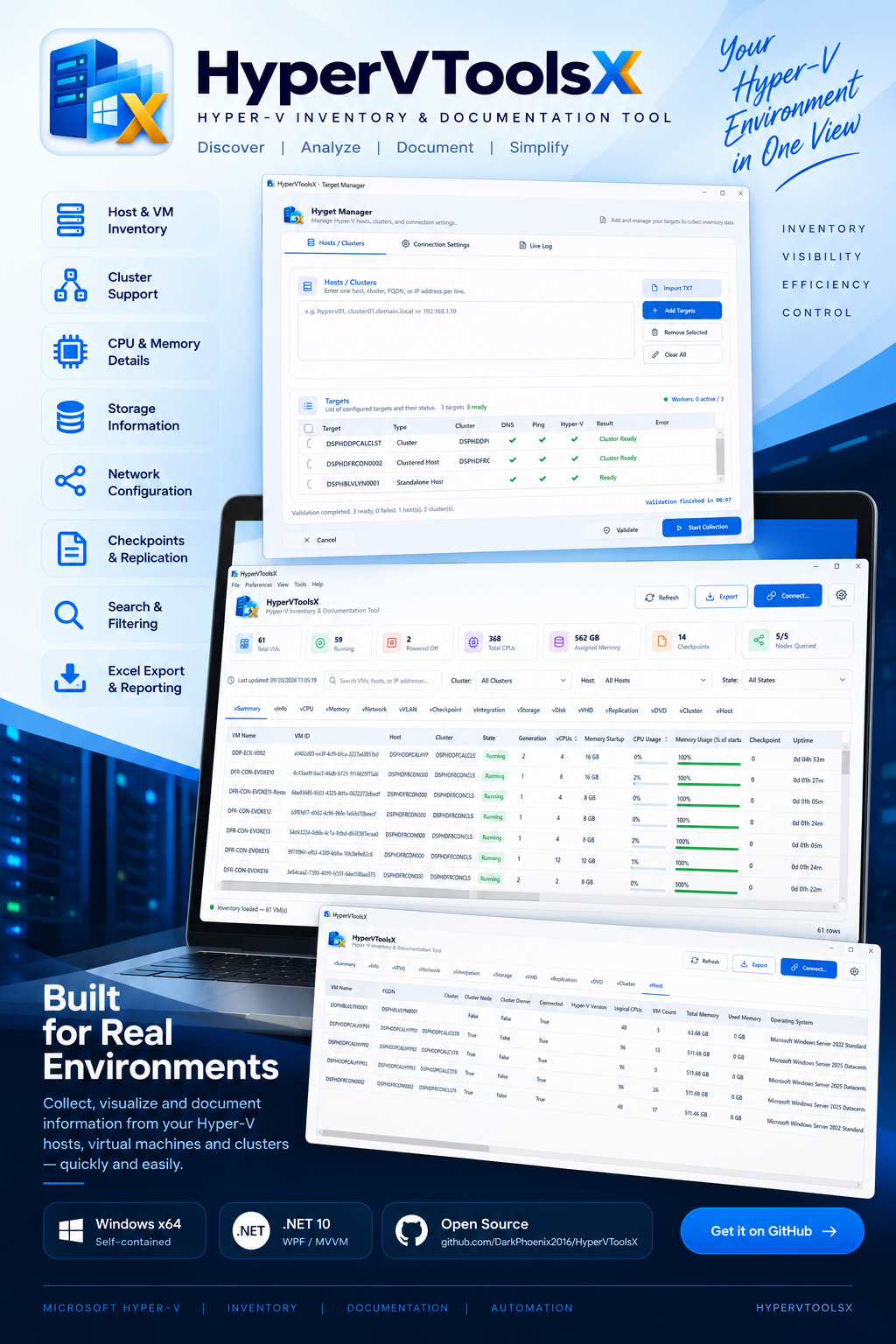
One of the things I wanted was a clean interface that didn't overwhelm the user.
Hyper-V administration can already involve a lot of technical information.
The tool shouldn't make that harder.
The goal was to make common operations easier to find and understand.
Instead of presenting everything as raw PowerShell output, the application could organize information into sections and actions.
The idea was:
HyperVToolsX
│
├── Virtual Machines
│
├── Storage
│
├── Networking
│
├── Host Information
│
├── Configuration
│
└── Tools
The exact functionality evolved during development, but keeping things organized became an important part of the design.
Working With Real Hyper-V Data
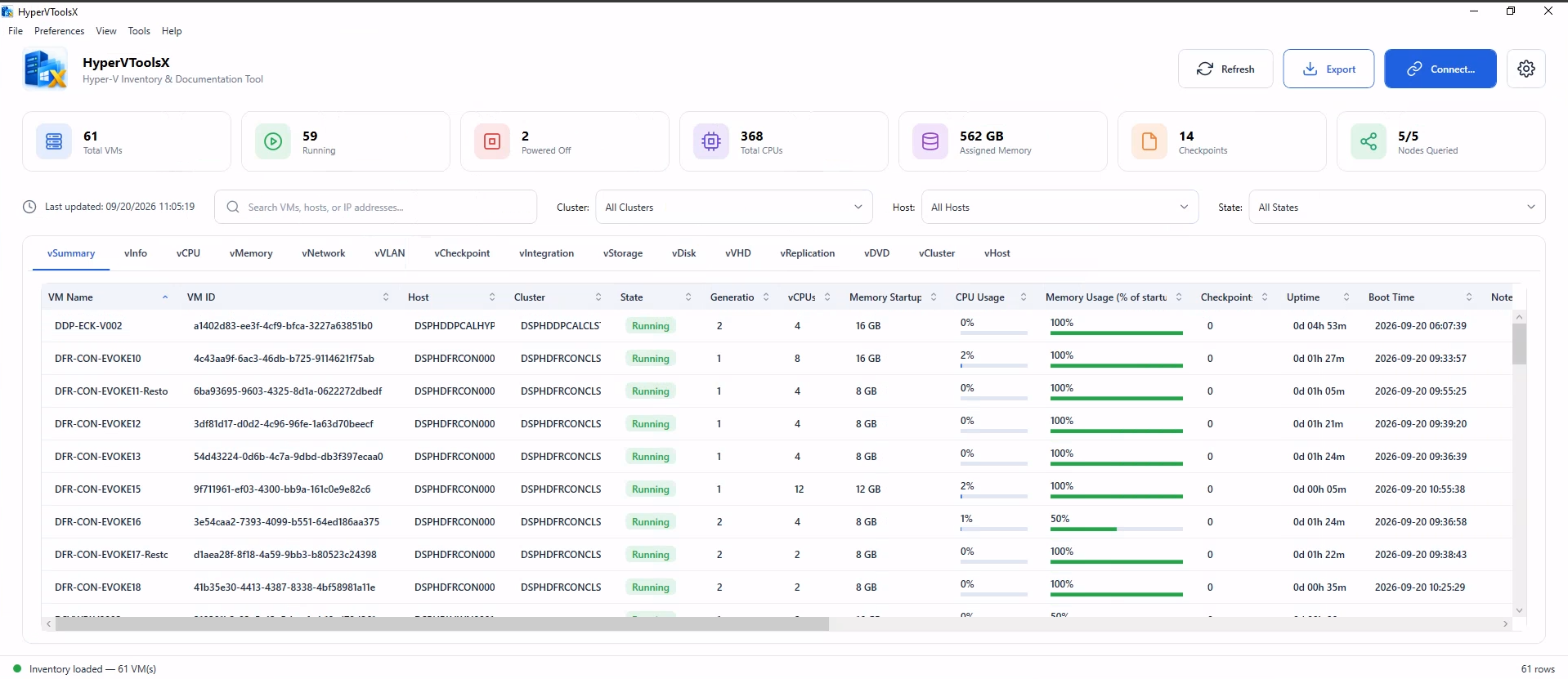
One of the interesting parts of building HyperVToolsX was dealing with real Hyper-V information.
A virtual machine isn't just a name and a status.
There can be information about:
- CPU
- Memory
- Virtual disks
- Network adapters
- Checkpoints
- Integration services
- Generation
- VM configuration
- Host information
- Storage locations
And different operations expose different pieces of that information.
I wanted the application to bring the relevant information together rather than forcing the user to run several commands manually.
Remote Management
Another important part of the project was thinking about remote Hyper-V environments.
Managing the local machine is one thing.
Managing another Hyper-V host introduces additional considerations.
You have to think about:
Local machine
     │
     ▼
Network
     │
     ▼
Remote Hyper-V Host
     │
     ▼
Virtual Machine
Now connectivity, permissions, PowerShell remoting, authentication, and firewall configuration can all affect whether an operation works.
This made HyperVToolsX more interesting because it wasn't just a UI project.
It became an infrastructure project as well.
Error Handling
This was one of the areas where I learned a lot.
When you're running commands manually, an error message in PowerShell is usually enough to tell you what went wrong.
Inside an application, you need to think about how that error should be presented to the user.
For example:
Connection failed
isn't particularly useful.
A better experience is to tell the user what operation failed and, where possible, what they can check.
This pushed me to spend more time thinking about error handling and validation.
Making It Safer
Administrative tools can potentially perform actions that affect virtual machines and infrastructure.
That means convenience can't come at the expense of control.
I started thinking more carefully about:
- Input validation
- Confirmation prompts
- Permissions
- Destructive operations
- Error handling
- Clear status messages
A tool should make an operation easier without making it dangerously easy to perform the wrong operation.
Packaging the Application
Another challenge was getting the application from something running on my development machine into something other people could actually use.
That introduced a completely different set of problems.
I had to think about:
- Builds
- Dependencies
- Packaging
- Versioning
- Configuration
- Installation
- Code signing
- Release files
Something can work perfectly on the developer's machine and still fail when another person tries to run it.
That was a good reminder that building software and delivering software are two different things.
The Code Signing Problem
One of the areas that caused me some frustration was code signing.
Modern Windows environments can be cautious about applications that aren't properly signed.
This becomes particularly important when distributing an administrative tool.
I had to learn more about how Windows treats executable files, certificates, trust, and application distribution.
It wasn't something I originally expected to spend much time on.
But that's often how projects go.
You start with:
"I just want to build a tool."
And eventually you're learning about things you never planned to touch.
Testing on Real Machines
Testing HyperVToolsX wasn't just about checking whether the interface opened.
I needed to see how it behaved with actual Hyper-V environments.
That meant checking different situations:
VM running
VM stopped
VM missing
Host unavailable
Permission denied
Invalid input
Network problem
Missing configuration
A tool that works perfectly when everything is normal isn't enough.
Infrastructure tools need to handle the situations where things aren't normal.
From Project to Production Release
One of the milestones I was particularly happy about was getting HyperVToolsX to its first production-ready release.
There's a big difference between:
"I built this on my computer."
and:
"This is a release that someone else can actually use."
Getting to that point required more than writing the core functionality.
It involved cleaning things up, testing, fixing problems, improving the interface, and thinking about how someone unfamiliar with the project would actually use it.
That was probably one of the most valuable parts of the project for me.
GitHub and Open Development
I also published HyperVToolsX on GitHub.
Having the project publicly available changes the way you think about your code.
When it's only on your own machine, you can get away with:
"I know what this does."
When someone else might look at it, suddenly you start thinking:
- Is the project organized?
- Is the README clear?
- Are the instructions understandable?
- Are the release files correct?
- Can someone else build it?
- Are the configuration requirements documented?
That pushed the project to become more complete.
What I Learned
HyperVToolsX taught me quite a few things that went beyond Hyper-V.
1. A Script and a Product Are Different
A script can solve your problem.
A tool needs to solve the user's problem.
That means thinking about the interface, errors, documentation, installation, and overall experience.
2. Infrastructure Software Needs Good Error Handling
In infrastructure, things will fail.
Servers go offline.
Permissions change.
Networks break.
Services stop.
A useful tool needs to handle those situations properly instead of simply crashing or showing an obscure error.
3. Small Problems Can Become Good Projects
HyperVToolsX didn't start as some huge software idea.
It started because I wanted to make a few Hyper-V tasks easier.
Sometimes that's enough.
You don't always need a revolutionary idea.
Sometimes you just need to solve a problem that you actually have.
4. Building the Tool Is Only Half the Work
I learned this particularly during the release process.
Writing the code is only one part.
You also need:
Development
    ↓
Testing
    ↓
Error Handling
    ↓
Packaging
    ↓
Documentation
    ↓
Release
    ↓
Maintenance
That entire process is part of software development.
What's Next?
HyperVToolsX is still something I want to keep improving.
There are plenty of ideas I'd like to explore, including:
- More Hyper-V management features
- Better VM inventory
- Improved remote management
- Additional storage tools
- Better networking information
- More automation
- Improved reporting
- Better logging
- More configuration options
- Continued UI improvements
I also want to keep learning from how people actually use the tool.
Sometimes the best feature ideas come after someone says:
"It would be useful if it could do this."
Final Thoughts
HyperVToolsX started with a simple problem:
I was tired of repeating the same Hyper-V tasks manually.
What started as PowerShell commands slowly became scripts, then utilities, and eventually a proper application.
Along the way, I learned much more than I expected.
I learned about application design, PowerShell integration, Hyper-V management, remote administration, error handling, packaging, code signing, releases, and documentation.
But probably the biggest lesson was this:
A useful tool doesn't have to completely change the world.
Sometimes it's enough to take something that takes ten steps and turn it into three.
That's what I wanted HyperVToolsX to be.
A practical tool that makes working with Hyper-V a little easier.